> For the complete documentation index, see [llms.txt](https://docs.hivel.ai/llms.txt). Markdown versions of documentation pages are available by appending `.md` to page URLs; this page is available as [Markdown](https://docs.hivel.ai/release-notes/release-notes-october-2024.md).
# Release Notes - October 2024
#### What’s New This Month!
### Introducing private dashboards
Your dashboard, your rules! Now, private dashboards are fully visible only to their owners, while public dashboards remain viewable but locked down for other users. Plus, an 'Access' option lets owners toggle dashboard visibility between public and private as needed. Note: all current dashboards are set as public in production.\
[*Go ahead and give it a try!*](https://app.hivel.ai/dashboard/custom-dashboards)
### Better navigation with a new side menu
Navigating just got easier with our organized side menu. All features are now conveniently grouped.
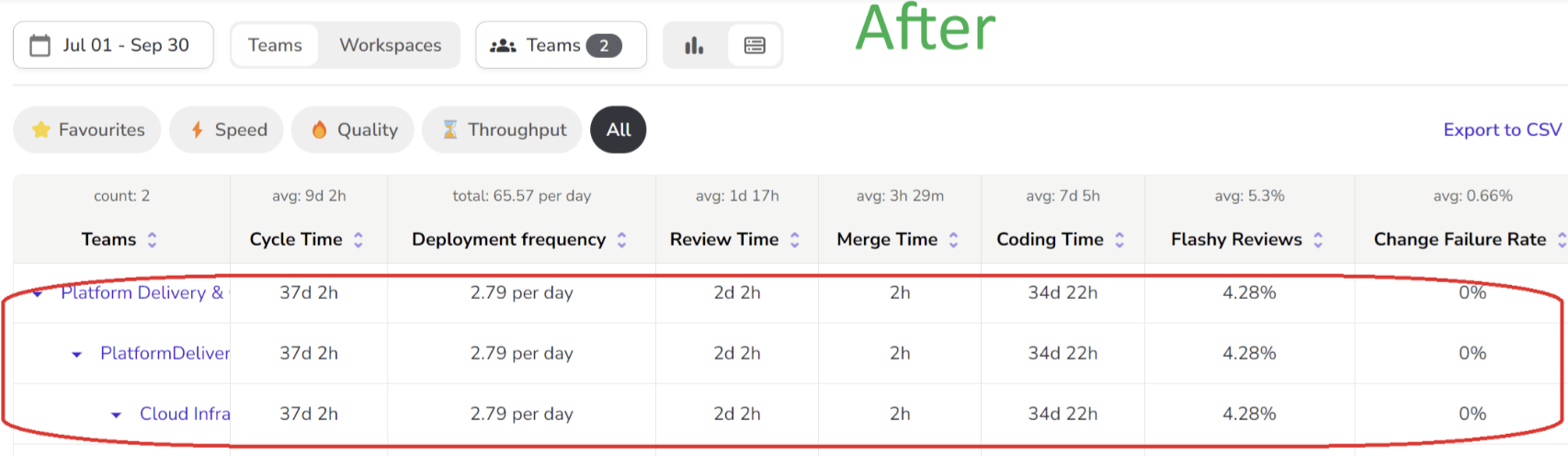
### See the big picture with updated parent-child team displays
For those working with hierarchical teams, we’ve updated how metrics reflect! Selecting a parent team now reveals all associated members—parent and sub-teams—across the app, and the metrics are aggregated across all the sub-teams. This ensures you have the full team picture wherever you need it.\
[*See it in action!*](https://app.hivel.ai/dashboard/cto)
### Team owner icons and new permissions
Spot your team owners at a glance! An icon now identifies team owners on the Teams page, ensuring transparency in team management. Note: team owners must transfer ownership before their team can be archived or deleted, keeping your team structure intact.
### User merges made smarter
We’ve made user merges smarter and more inclusive. Now, when multiple users are merged (e.g., User 1 into User 2, and then User 2 into User 3), the final user (User 3) will inherit team memberships and data from all prior merges across parent and sub-teams.
### (Phased roll-out) Fine-tune your PR exclusions with new one-to-one option
We’ve introduced a new 'One to One' option in PR Exclusions, offering precise control over branch exclusions. Now, configure up to 10 unique source-destination branch pairs, which will exclude corresponding PRs from your metrics. Prefer the traditional setup? The existing 'Many to Many' feature remains unchanged, giving you flexibility to choose the best fit for your workflow. Configuration changes apply to data processed post-save.
***
Take a moment to breathe🧘♀️! You’re all caught up, and it’s time for a well-earned coffee break ☕. See you next month!
{% embed url="" %}



.png?alt=media&token=23d18208-cc70-4e41-8264-61afaa25232e)
